OBD2 not connecting to ECM

S13Hitman

Member
Joined
Oct 20, 2017
Posts
80
Location
Hilton Head
Trying to diagnose why the dummy light is on but 2 different OBD2 scanners are not connecting to the ECM. I tried using my Bluetooth scanner which has always worked fine and then purchased a wired one from Amazon.

Yes, the #13 fuse (cigar) tested good. I have continuity from the OBD2 connector to the #13fuse, but I'm not having any luck finding the cigar fuse in the FSM. If anyone has a diagram of the cigar fuse and it's circuit that they could post I would so greatly appreciate it.

*Trying to diagnose an intermittent misfire. Replaced with ACDelco plugs and the #4 coil since it died on me. It seems my TB has never-ending wiring issues. But I like fixing things :)
 
Trying to diagnose why the dummy light is on but 2 different OBD2 scanners are not connecting to the ECM. I tried using my Bluetooth scanner which has always worked fine and then purchased a wired one from Amazon.

Yes, the #13 fuse (cigar) tested good. I have continuity from the OBD2 connector to the #13fuse, but I'm not having any luck finding the cigar fuse in the FSM. If anyone has a diagram of the cigar fuse and it's circuit that they could post I would so greatly appreciate it.

*Trying to diagnose an intermittent misfire. Replaced with ACDelco plugs and the #4 coil since it died on me. It seems my TB has never-ending wiring issues. But I like fixing things :smile:

With the fuse testing good and having continuity mean you have 12 volt power at the DLC? And ground at the DLC? Do the scanners power up?

Trying to see if this is a power issue or a communication issue.
 
  • Like
Reactions: Mooseman
Yes the scanner does power up and runs the test but states not able to connect to ECM/PCM


So it's a communications issue it would appear.

What model year is it? Later years ran a different network type for the PCM than the early years did.
 
2002 4.2l

I don't mind chasing some wires down but I cannot find the diagram for this circuit. I appreciate your assistance very much.
 
you might just try disconnecting the connectors at the PCM and checking / cleaning (if necessary) to see if your problem goes away. After that, if not, do a simple resistance measurement at the obd connector across the data pair of pins (use a standard OBD connector wiring pin out which is on-line everywhere).... do this without the battery connected.
 
but I cannot find the diagram for this circuit

 
"computer data lines"
Fig 21

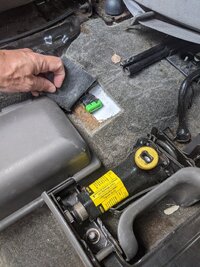
A purple wire runs from the DLC to the splice pack under the left end of dashboard
 
So finally digging into this today I see that splice pack 205 goes to splice pack 206, is 206 the bigger block of wires underneath the dash? I found 205, just need to know where pack 206 is located. Dang diagram doesn't say. Going to poke around to see if I can find it.

I have continuity from the OBD2 connector to the splice pack 205, somewhere its likely broken though, trying to chase it down.
 
Will Robinson's Video listed next...is THE Signature Instructional on how to Diagnose the Two Class 2 Network Splice Packs... and SO Much More... Bar NONE!

 
So finally digging into this today I see that splice pack 205 goes to splice pack 206, is 206 the bigger block of wires underneath the dash? I found 205, just need to know where pack 206 is located. Dang diagram doesn't say. Going to poke around to see if I can find it.

I have continuity from the OBD2 connector to the splice pack 205, somewhere its likely broken though, trying to chase it down.

Short answer...

IMG_20200822_130721.jpg
 
Brother! Thank you. So now that I'm digging through the wire diagram I see how many things are intertwined with the splice packs, AKA splice pack Network. I had issues with my ABS light going on and off but no actual issues with the hardware or mechanically.

Seems like it may have caused other odd issues. my time in hunting these wires is on and off with the family and dinner and everything.
 

Forum Statistics

Threads
24,318
Posts
649,252
Members
20,857
Latest member
Gshaule65

Members Online