"Report a bug" thread...

Status
Not open for further replies.

harmless

Member
Joined
Nov 21, 2011
Posts
2,049
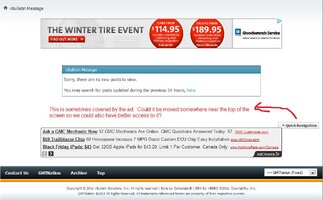
Felt that we needed a place to put random, small bugs that need to be squashed...

Here's one:

View attachment 16503

Sometimes that button gets covered by ads.

Wouldn't it also be better located at the top of the page and not the bottom? Being it's a "quick" access type of button?

:thankyou:
 

Attachments

  • Quick Nav.jpg
    Quick Nav.jpg
    89.1 KB · Views: 27
harmless said:
Felt that we needed a place to put random, small bugs that need to be squashed...

Here's one:

View attachment 235

Sometimes that button gets covered by ads.

Wouldn't it also be better located at the top of the page and not the bottom? Being it's a "quick" access type of button?
:thankyou:

I can't even FIND that button on any of my screens!!! :rotfl:
 
Upvote 0
Blckshdw said:
I can't even FIND that button on any of my screens!!! :rotfl:

Shows you how much time I have on my hands... :rotfl:

Read all your threads, mark them as "read" then hit the "new post" button. At the bottom of that "you have nuttin'" screen is THAT button.

I suspect it may have been meant for the title bar, but it seems it never made it there... :eek:

:crazy:
 
Upvote 0
Oh, THERE it is!! I spent about 5 minutes clicking everything and couldn't figure out what page you were on for that :bonk:
 
Upvote 0
Blckshdw said:
Oh, THERE it is!! I spent about 5 minutes clicking everything and couldn't figure out what page you were on for that :bonk:

Lol. Again, I aparently have more time than that invested into poking around the new sandbox. :lipsrsealed: :rotfl:

I need to move to a warmer climate (or get a real garage) so I can spend more time modding and less time trolling... :compu-punch:
 
Upvote 0
LOL, I have never had the ad banner cover it up. You must be using IE...
 
Upvote 0
djthumper said:
LOL, I have never had the ad banner cover it up. You must be using IE...

I am. That aside, I still think the "quick access" type menus should be on top of a page, not the bottom. Scrolling down to get to a quick menu kinda seems absurd. :crazy:
 
Upvote 0
harmless said:
I am. That aside, I still think the "quick access" type menus should be on top of a page, not the bottom. Scrolling down to get to a quick menu kinda seems absurd. :crazy:

Jman is really busy this week, but he will take a look at it. I keep adding stuff to his to-do list. :biggrin:
 
Upvote 0
I figured it would eventually make some list... No rush. I seem to be the only one who noticed it!! :rotfl:
 
Upvote 0
I have seen it happen as well.
 
Upvote 0
Kyle is just trying to make you feel better...
 
Upvote 0
When I logged in with my Droid incredible, I hit the login button after putting in my info, and it said redirect link invalid... I clicked to go to the full site, and I was logged in, though, so it didn't lose information....

Mike
 
Upvote 0
harmless said:
Felt that we needed a place to put random, small bugs that need to be squashed...

Here's one:

View attachment 235

Sometimes that button gets covered by ads.

Wouldn't it also be better located at the top of the page and not the bottom? Being it's a "quick" access type of button?

:thankyou:

This is most likely because you are using IE in compatibility mode. I cannot support issues seen within compatibility mode in IE. The site and new features are tested with IE8+ (non-compatibility mode), Chrome, FireFox, Safari, and Opera. Make sure you don't have compatibility mode enabled for "all sites" or just for GMTNation!

Bartonmd said:
When I logged in with my Droid incredible, I hit the login button after putting in my info, and it said redirect link invalid... I clicked to go to the full site, and I was logged in, though, so it didn't lose information....

Mike

I will look into this, I've heard a few people mention this problem.
 
Upvote 0
Bartonmd said:
When I logged in with my Droid incredible, I hit the login button after putting in my info, and it said redirect link invalid... I clicked to go to the full site, and I was logged in, though, so it didn't lose information....

Mike

I've had this happen twice when I first joined when logging in through my Xoom. Hasn't happened anymore though. :undecided:
 
Upvote 0
Jman423 said:
This is most likely because you are using IE in compatibility mode. I cannot support issues seen within compatibility mode in IE. The site and new features are tested with IE8+ (non-compatibility mode), Chrome, FireFox, Safari, and Opera. Make sure you don't have compatibility mode enabled for "all sites" or just for GMTNation!

Hey Jman423,

I have IE8 but I am not running anything in "compatibility" mode. (confirmed)

:undecided:
 
Upvote 0
harmless said:
Hey Jman423,

I have IE8 but I am not running anything in "compatibility" mode. (confirmed)

:undecided:

I can't reproduce the problem without using compatibility mode. I can't fix what I can't see, and IE has to be the only browser that does what it wants as opposed to the excellent compatibility that all of the other browsers offer.

I hate IE :hissyfit:
 
Upvote 0
Jman423 said:
I can't reproduce the problem without using compatibility mode. I can't fix what I can't see, and IE has to be the only browser that does what it wants as opposed to the excellent compatibility that all of the other browsers offer.

I hate IE :hissyfit:

:dielaugh::dielaugh:

Tell me about it.

No biggie boss, saw what I felt was a bug and brought it up. It's not affecting any other aspect of my experience with the Forum, so I don't moseying on to my next adventure. :cool:
 
Upvote 0
Upvote 0
So when I try to copy a URL into the picture button to post a picture, a lot of times it is telling me the pictures is too large in file. Is that something wrong I am doing or the site?
 
Upvote 0
ItsOnVoy said:
So when I try to copy a URL into the picture button to post a picture, a lot of times it is telling me the pictures is too large in file. Is that something wrong I am doing or the site?

I think the dimensions and file size limits are smaller here for attachments, than the OS. :undecided:
 
Upvote 0
Blckshdw said:
I think the dimensions and file size limits are smaller here for attachments, than the OS. :undecided:

That is what I figured! I mean the picture is like 600x500 so its not crazy big but not sure if that can be fixed to have a larger limit maybe?
 
Upvote 0
ItsOnVoy said:
That is what I figured! I mean the picture is like 600x500 so its not crazy big but not sure if that can be fixed to have a larger limit maybe?

We are sharing a server with a pretty large site that uses a lot of space and server resources. While we attempt to raise the money we need to pay for a year of hosting on a dedicated server, the limits need to stay relatively low. I do think you should be able to upload your attachment though, it is probably the file size, not the dimensions, that are too high.
 
Upvote 0
ItsOnVoy said:
So when I try to copy a URL into the picture button to post a picture, a lot of times it is telling me the pictures is too large in file. Is that something wrong I am doing or the site?

When you use the URL tab, make sure to UNCHECK that little tick box below the URL area...

This makes sure you use the URL's information (no limits) and not download the pic from the URL to your attachements portfolio (which has size limits).

(From my experience)

:coffee:
 
Upvote 0
Ohh okay got it!! Ill give that a shot then
 
Upvote 0
Some image in the "BOSS" thread force closes Tapatalk on me, 100% of the time, very repeatably. Droid X, Android 2.3.3, Verizon. Exception: java.lang.OutOfMemoryError, Bitmap size exceeds VM budget.

http://gmtnation.com/f18/everyone-who-joined-november-2011-boss-189/

The thread opens, the posts appear, and then when it's filling in the images it bombs.

Anybody else seeing this behavior?
 
Upvote 0
the roadie said:
Some image in the "BOSS" thread force closes Tapatalk on me, 100% of the time, very repeatably. Droid X, Android 2.3.3, Verizon. Exception: java.lang.OutOfMemoryError, Bitmap size exceeds VM budget.

http://gmtnation.com/f18/everyone-who-joined-november-2011-boss-189/

The thread opens, the posts appear, and then when it's filling in the images it bombs.

Anybody else seeing this behavior?

It did not do that to me when I opened it. Did you try to just close down the browser and re open it? Sometimes it needs that.
 
Upvote 0
:undecided: I was about to chime in too, then realized Roadie's using Tapatalk which I don't have yet...
 
Upvote 0
My loaded fine. Using tapatalk on mu iPhone 4s through Verizon

4b5bf02b-dfd7-bd9c.jpg


Sent from my iPhone using Tapatalk
 
Upvote 0
After the Deadline - Spell and Grammar Checker for Firefox doesn't work here. It makes the post 1 line and does nothing when you right click on the mistake
 
Upvote 0
Status
Not open for further replies.

Forum Statistics

Threads
24,250
Posts
648,420
Members
20,689
Latest member
dstairs

Members Online